SHEIN Free Trial Program: How It Works
By: Lucas Bastos on Last updated on:
Advertisements
How to Submit Requests in Shein’s Free Trial Center
Six practical steps based on Shein’s Free Trial Help Center — from opening the hub to completing the review.
Independent educational guide — Prepared from publicly available information in Shein’s Free Trial Help Center. We are not affiliated with Shein. Participation is selective and approval is never guaranteed. Always follow the official terms of each campaign.
If the Free Trial section felt unclear, that is common. The path is easier once it is split into a fixed order: open the hub, apply, wait for status, receive the item if approved, submit the review, then track the report outcome.
Selection is never guaranteed. Following the official rules helps avoid the errors that stop a request early.
Open the Free Trial Center
Sign in to your Shein account. In the app, go to your profile → More Services (or More) → Free Trial Center. On the website, look for Free Trial under account, community or services.
Browse the items listed at that moment. The catalog rotates, so what you see on one visit may not be there later.

Example path into the Free Trial Center
Apply for up to 3 items per week
You can submit up to 3 applications per week. Unused opportunities do not accumulate.
When you find an item you want to evaluate:
- Tap Free Trial on the listing
- Choose the correct size
- Select a delivery address in the same country as the Shein site you are using
- Tap Submit
Important: if the address country does not match the site region, the application typically fails. Confirm this before you send the request.
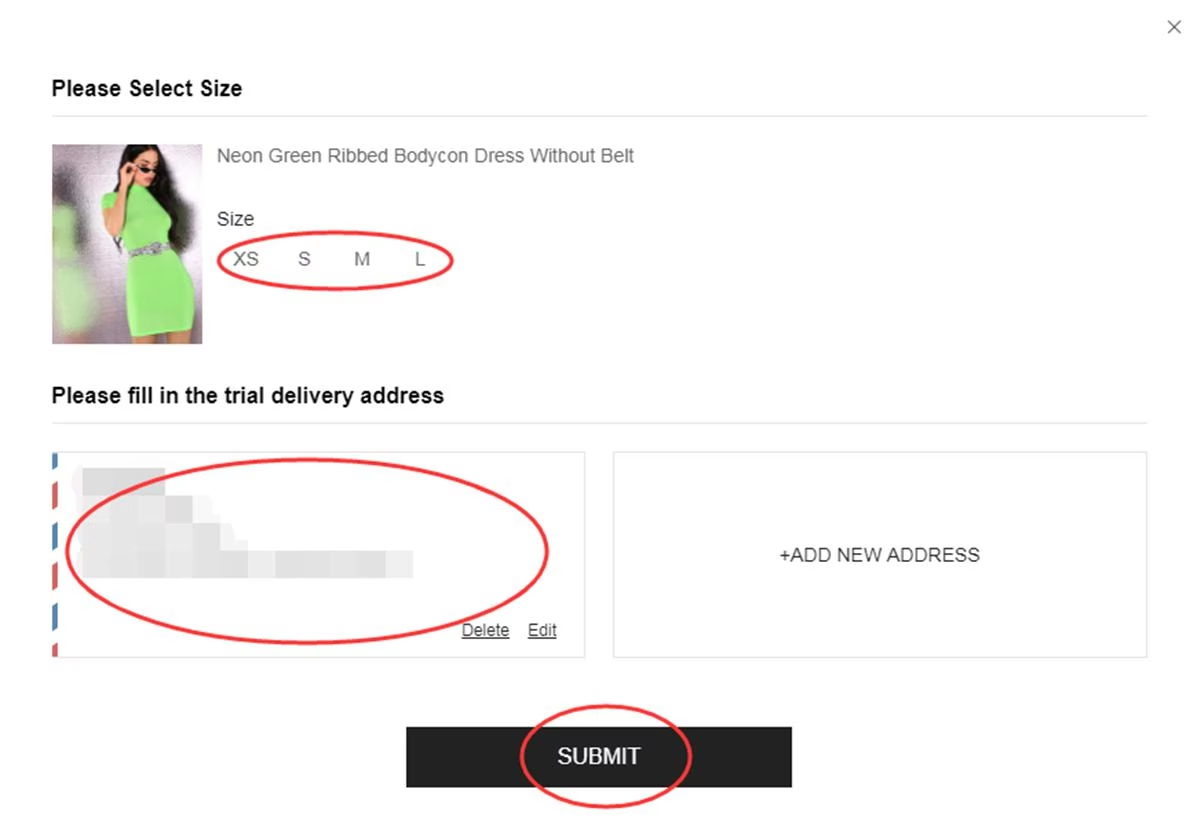
Size and address confirmation screen
Check the result in My Free Trial
Results are usually updated within about one week. Open My Free Trial / My Applications to see the status:
- Approved — the request was selected. A $0 order is created and shipped automatically.
- Failed — that request was not selected. You can apply for other listings in later weekly cycles.
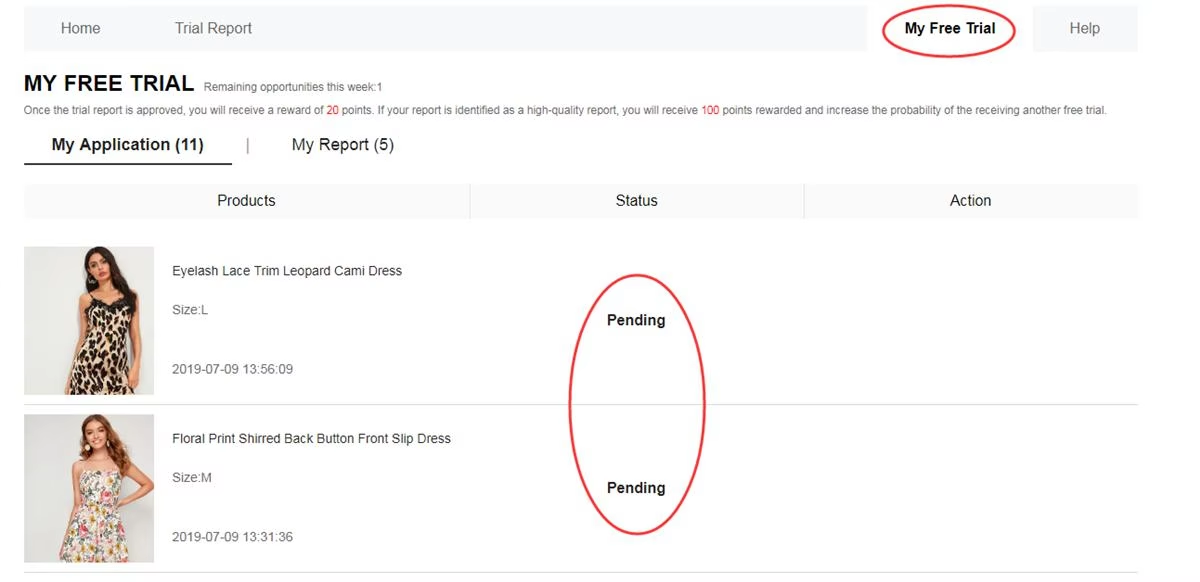
Where application status is tracked
Receive the item and use it as usual
If the status is Approved, Shein generates the order at $0 and ships it. There is no extra checkout step for that trial order.
When the package arrives, use the product normally. Note fit, fabric, construction, comfort and everyday wear before you write the report. Shipping is covered by Shein; customs or import duties may still apply depending on the country.
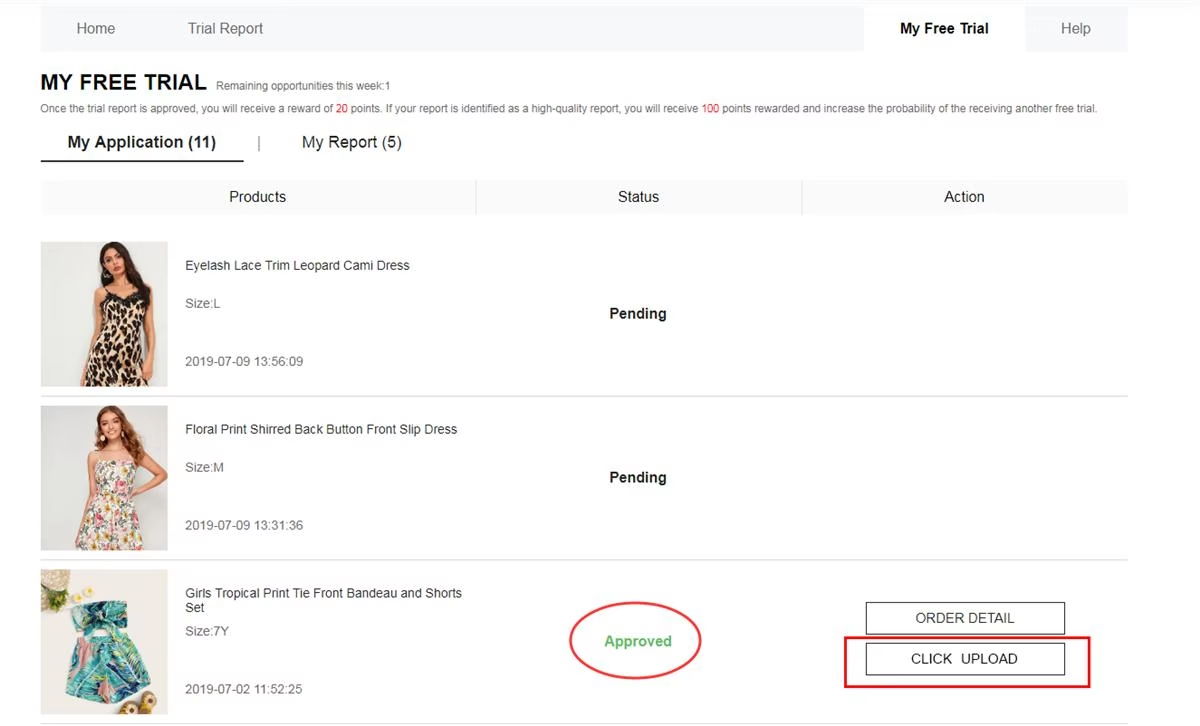
After approval, the item is shipped for evaluation
Submit a detailed review with photos
Open Post Report / My Report and send the review within 10 days of delivery. In most campaigns, the item is kept after that required evaluation is accepted.
A useful report usually covers quality, style, fit, fabric and construction, and includes:
- Clear pros and cons — not only praise
- Original photos — ideally 1 full-body shot and 2 detail shots
- Specific notes on comfort and sizing
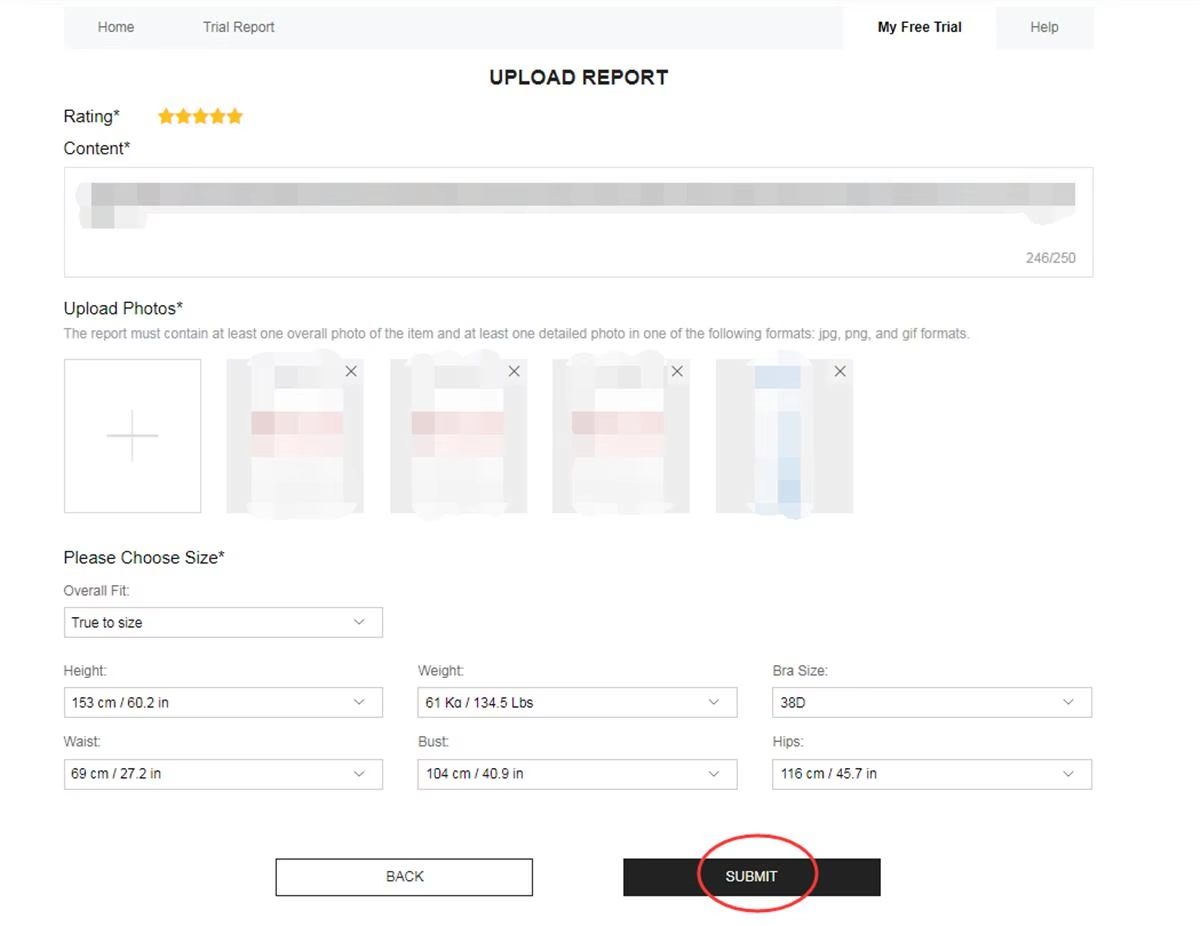
Review and photo upload stage
Track the report, points and next cycle
An accepted review typically grants 20 points. A Quality Report can add up to 100 extra points. If the first version is rejected, one extra chance to edit and resubmit is usually offered.
Missing the deadline, sending a thin report, or using multiple accounts can reduce later eligibility. Keep the profile updated, apply again when new listings appear (still max 3 per week), and complete every pending report.
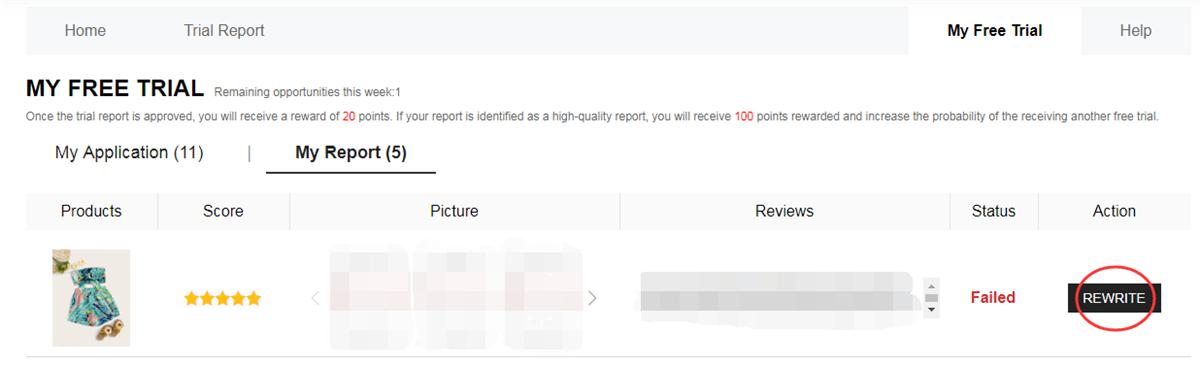
Report outcome, points and next applications
Rules that usually matter
- Maximum of 3 applications per week (slots do not roll over)
- Shipping country must match the current Shein site
- Shipping is covered by Shein; customs or import duties may apply by country
- Submit the review within 10 days after delivery
- Fake or multiple accounts can lead to a Free Trial ban
- Missing the review deadline can hurt later selections
Mistakes that often stop a request
- Incomplete profile or incorrect size
- Address country different from the site region
- Applying after high-demand listings are already full
- Short reviews without original photos
- Missing the review deadline
- Creating extra accounts to send more applications
High-demand items can fill quickly. People who keep the profile updated, apply when new listings appear, and complete reports on time tend to navigate the process with fewer avoidable errors. Approval is still never guaranteed.
Frequently asked questions
Is shipping covered?
Shein typically covers shipping. Local customs or import charges may still apply depending on the country.
How many applications can I send?
Up to 3 per week. Unused attempts reset and do not carry over.
Can selected users keep the products?
In most campaigns, yes — after the required review is accepted within the stated deadline. Check that campaign’s terms.
When is the result available?
Usually within about one week. Check My Free Trial / My Applications for Approved or Failed.
What if the review is rejected?
One extra chance to edit and resubmit is generally offered. Follow the photo and content requirements before sending the revised report.
Do I need a large following?
No. Detailed reviews, complete profile data and consistent activity usually matter more than follower count.
The full cycle is: open the Free Trial Center → apply (max 3/week) → wait for status → if approved, receive the item → submit an honest review with photos → track the report and prepare the next weekly cycle. Approval is never guaranteed.
Ready to open the official Free Trial Center?
See the listings available this week and submit requests following the official sequence. Selection is never guaranteed.
OPEN FREE TRIAL CENTER NOWYou will be redirected to Shein’s official Free Trial Center.
Reference: Shein Free Trial Help Center
Lucas Bastos
I'm a content creator fueled by the idea that the right words can open doors and spark real change. I write with intention, seeking to motivate, connect, and empower readers to grow and make confident choices in their journey.